From Chatbot to Agent: What Changes in Architecture
From Chatbot to Agent: What Changes in Architecture
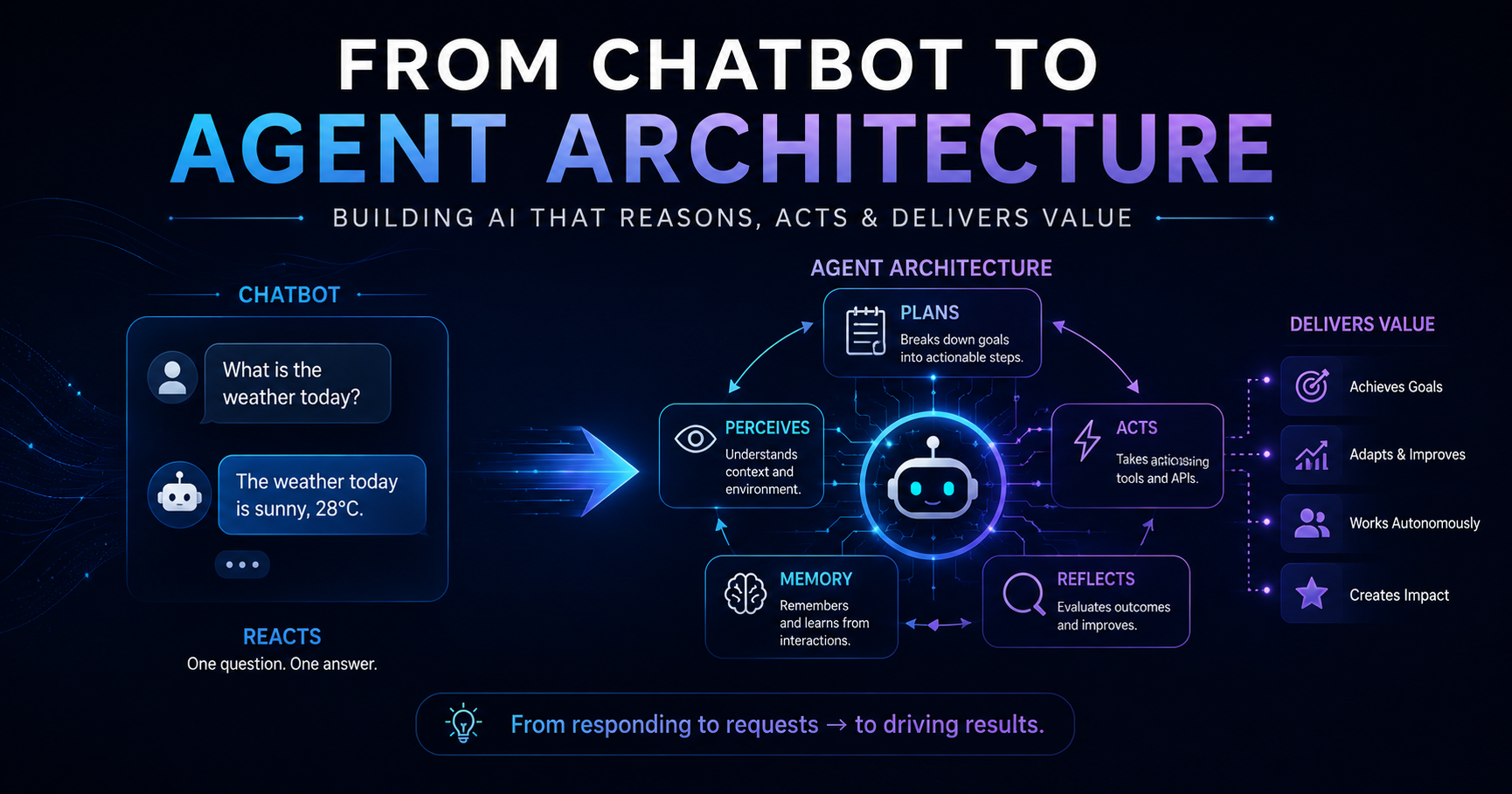
Most developers start building AI applications the same way: call an LLM with a prompt, get a response, display it. That works for Q&A, summarization, and content generation. But when you need an AI system that can use tools, remember context across steps, and make decisions autonomously — you need an agent architecture, not a chatbot.
Having transitioned production systems from simple LLM integrations to full agentic pipelines, the shift is more fundamental than it first appears.
The Chatbot Pattern
A chatbot is essentially a stateless function:
1
2
3
4
5
6
7
8
9
10
11
12
from langchain_anthropic import ChatAnthropic
from langchain_core.messages import SystemMessage, HumanMessage

llm = ChatAnthropic(model="claude-sonnet-4-6")

def chat(user_message: str, history: list) -> str:
    response = llm.invoke([
        SystemMessage(content="You are a helpful assistant."),
        *history,
        HumanMessage(content=user_message)
    ])
    return response.content
Simple, predictable, appropriate for many use cases. The LLM has no ability to take action in the world — it can only produce text.
The Three Pillars of Agent Architecture
Agents differ from chatbots in three fundamental ways:
1. Tools (Action)
An agent can call external functions — APIs, databases, code executors, file systems. The LLM decides when and with what arguments to call them.
2. Memory (State)
Agents maintain state across steps:
- Short-term: The current trajectory (all steps taken so far)
- Long-term: Vector store retrieval of past interactions and knowledge
- Working memory: Scratchpad for intermediate reasoning
3. Planning (Reasoning)
Agents don’t just respond — they reason about a sequence of actions needed to achieve a goal, observe results, and adapt when things go wrong.
The Agent Loop: ReAct Pattern
The foundational pattern for agents is ReAct (Reasoning + Acting):
1
Observation → Thought → Action → Observation → Thought → Action → ... → Final Answer
The LLM sees what happened (observation), reasons about what to do next (thought), calls a tool (action), and gets back a result (new observation). This loop repeats until the goal is achieved or a limit is hit.
1
2
3
4
5
6
7
8
9
10
11
12
13
14
15
16
17
18
19
20
21
22
23
24
25
26
27
28
29
30
31
32
33
34
35
36
37
38
39
40
41
42
43
44
45
46
47
48
from langchain_anthropic import ChatAnthropic
from langchain.agents import create_react_agent, AgentExecutor
from langchain_core.tools import tool
from langchain import hub

@tool
def search_knowledge_base(query: str) -> str:
    """Search the knowledge base for relevant information."""
    results = vector_store.similarity_search(query, k=3)
    return "\n".join([doc.page_content for doc in results])

@tool
def run_data_query(sql: str) -> str:
    """Execute a read-only SQL query and return results as JSON."""
    try:
        with db.connect() as conn:
            result = conn.execute(text(sql))
            rows = [dict(row) for row in result]
            return json.dumps(rows[:50])  # Cap at 50 rows
    except Exception as e:
        return f"ERROR: {str(e)}"  # Return errors, don't raise

@tool
def send_notification(channel: str, message: str) -> str:
    """Send a notification to a Slack channel."""
    response = slack_client.chat_postMessage(channel=channel, text=message)
    return "Notification sent" if response["ok"] else f"Failed: {response['error']}"

llm = ChatAnthropic(model="claude-sonnet-4-6")
tools = [search_knowledge_base, run_data_query, send_notification]

prompt = hub.pull("hwchase17/react")
agent = create_react_agent(llm, tools, prompt)

executor = AgentExecutor(
    agent=agent,
    tools=tools,
    verbose=True,
    max_iterations=15,
    handle_parsing_errors=True,
    return_intermediate_steps=True  # Critical for debugging
)

result = executor.invoke({
    "input": "Analyze this week's API error rate and notify the #alerts channel if it's above 2%"
})

# result["intermediate_steps"] contains the full trajectory
Architecture Comparison
flowchart LR
    subgraph Chatbot
        direction TB
        U1[User] -->|message| L1[LLM]
        L1 -->|response| U1
    end

    subgraph Agent
        direction TB
        U2[User] -->|goal| OR[Orchestrator LLM]
        OR -->|Thought + Action| TL[Tool Layer]
        TL --> T1[Search KB]
        TL --> T2[Query DB]
        TL --> T3[Call API]
        T1 & T2 & T3 -->|Observation| OR
        OR -->|Final Answer| U2
        MEM[(Memory)] <-->|read/write| OR
    end
Chatbot vs Agent: The Practical Differences
| Dimension | Chatbot | Agent |
|---|---|---|
| Execution model | Single LLM call | Multi-step loop |
| State | Stateless | Stateful trajectory |
| Actions | Text only | Tools, APIs, code execution |
| Failure recovery | None | Retry, replanning |
| Latency | 1–3 seconds | 5–60+ seconds |
| Cost | 1–2 LLM calls | N LLM calls |
| Best for | Q&A, summarization | Research, automation, multi-step tasks |
What Actually Changes in Your Codebase
Prompts become contracts
Your system prompt must now include:
- Descriptions of every available tool
- Instructions for the reasoning format (thought → action → observation)
- Constraints on what the agent should and shouldn’t do
- Expected output format when the task is complete
Error handling must be built into tools
When a tool fails, the agent needs to receive an error string it can reason about — not an exception that crashes the loop.
1
2
3
4
5
6
7
8
9
10
11
12
13
@tool
def fetch_user_profile(user_id: str) -> str:
    """Fetch a user's profile data by their ID."""
    if not user_id or not user_id.startswith("usr_"):
        return "ERROR: Invalid user_id format. Expected format: usr_XXXXX"

    try:
        user = db.get_user(user_id)
        if not user:
            return f"ERROR: No user found with ID {user_id}"
        return json.dumps(user.to_dict())
    except DatabaseError as e:
        return f"ERROR: Database unavailable: {str(e)}"
The agent sees "ERROR: No user found with ID usr_12345" and can decide to try a different user ID, ask the user for clarification, or report that it cannot complete the task.
Observability is no longer optional
With a chatbot: one input, one output — debugging is trivial.
With an agent: a trajectory of N steps — you need to trace every decision.
Add tracing before you ship anything to production:
1
2
3
4
5
6
7
8
9
10
11
from langfuse import Langfuse
from langfuse.callback import CallbackHandler

langfuse = Langfuse()
handler = CallbackHandler()

result = executor.invoke(
    {"input": user_query},
    config={"callbacks": [handler]}
)
# Every step is now traced in Langfuse with latency, tokens, and reasoning
Testing strategy changes completely
Unit tests for chatbots are straightforward. Agent testing requires three layers:
- Tool unit tests — test each tool in isolation with known inputs
- Trajectory tests — assert the agent took the right sequence of steps
- End-to-end evals — measure task completion rate over a golden dataset
1
2
3
4
5
6
7
8
9
10
# Tool unit test
def test_run_data_query_handles_invalid_sql():
    result = run_data_query.invoke("DROP TABLE users")
    assert result.startswith("ERROR:")

# Trajectory test with LangSmith
def test_agent_calls_search_before_summarizing():
    result = executor.invoke({"input": "Summarize the Q3 performance report"})
    tool_calls = [step[0].tool for step in result["intermediate_steps"]]
    assert "search_knowledge_base" in tool_calls
When Not to Use an Agent
Not every problem needs an agent. Use a plain LLM call when:
- The task completes in a single prompt (summarization, classification, generation)
- Latency matters — agents add seconds per step
- Cost per request is a constraint
- The output is purely text with no external actions needed
Agents shine when a task genuinely requires: deciding which tools to use, executing multiple steps in sequence, adapting based on intermediate results, or recovering from partial failures.
Key Takeaways
- The agent loop is the core abstraction — perceive → reason → act → observe → repeat
- Tools define capability — a well-designed tool library is more valuable than a better LLM
- Return errors as strings — never let tool exceptions crash the agent loop
- Trace everything from day one — you cannot debug what you cannot observe
- Agents are overkill for simple tasks — match the architecture to the problem
Part of the Agentic AI in Practice series — lessons from building production multi-agent systems.